

How to Use Remote Smart Parking Assist With Your Genesis

Parallel parking in a tight downtown space or squeezing into a narrow garage can be nerve-wracking—even for experienced drivers. Luckily, Genesis has introduced one of the most convenient and innovative features available today: Genesis Remote Smart Parking Assist. At Genesis of Milwaukee in Waukesha, WI, customers often ask about this advanced feature and its potential to enhance their daily driving experience. The answer? It’s one of those things that, once you use it, you’ll wonder how you ever lived without it.
What Is Remote Smart Parking Assist?
Let’s start with the basics—what is Remote Smart Parking Assist? In simple terms, it’s a system designed to help your Genesis park itself, either while you’re behind the wheel or standing outside the vehicle. Using a combination of sensors, cameras, and innovative software, your Genesis can automatically maneuver into or out of a parking spot with just the key fob and a touch of a button or via the in-car controls.
Think of it as your personal parking assistant. The system takes control of the steering, acceleration, braking, and gear shifts to guide the car safely into tight spaces. Whether it’s parallel or perpendicular parking, Genesis Remote Smart Parking Assist uses advanced radar and ultrasonic sensors to judge distance and angles with precision that’s tough to match manually.
This feature isn’t just about convenience—it’s also about confidence. For drivers who may feel uneasy about tight parking spots or low-visibility areas, Remote Smart Parking Assist provides peace of mind. It can even pull your Genesis straight out of a parking space when another car parks too close for you to open your door.
How to Turn On and Use Remote Smart Parking Assist
Getting started with this feature is simple once you understand the steps. Here’s a breakdown of how to use Genesis Remote Smart Parking Assist both from inside and outside your vehicle:
1. Activating It From Inside the Vehicle
- Start by bringing your Genesis to a complete stop in front of a parking space.
- Press the “Parking/View” button on the center console to activate the parking assistance system.
- Choose “Remote Smart Parking Assist” from the on-screen options.
- Simply follow the on-screen prompts and hold the “Park” button to begin. The system will take over completely, steering, braking, and accelerating while you monitor the process.
During this time, you can keep your hands off the wheel—but stay alert. The system works automatically, but the driver remains responsible for monitoring safety and surroundings.
2. Using It Remotely From Outside the Vehicle
Here’s where things get really interesting. Genesis takes innovation a step further by allowing you to control the parking process even when you’re not inside the car.
- With your Genesis in “Park” and the engine running, step out of the vehicle with your key fob.
- Stand within about 13 feet of your car.
- On your key fob, press and hold either the “Forward” or “Reverse” button.
- Your Genesis will automatically move into or out of a parking spot, using sensors to detect nearby obstacles.
This function is handy when parking in tight spots—such as your garage or a crowded parking lot—where getting in or out of the car can be tricky.
Why Genesis Remote Smart Parking Assist Is Innovative
Genesis has always stood out for its commitment to combining luxury and technology, and Remote Smart Parking Assist is a prime example of that philosophy. It’s not just a gimmick—it’s a real-world solution for modern driving challenges.
This system uses cutting-edge ultrasonic and radar sensors to detect the size of parking spaces, curbs, and even moving obstacles. It can automatically stop if a person or object suddenly crosses its path, adding an extra layer of safety. And because it’s integrated with the vehicle’s cameras, it offers precise, real-time visuals on the infotainment screen to keep you informed.
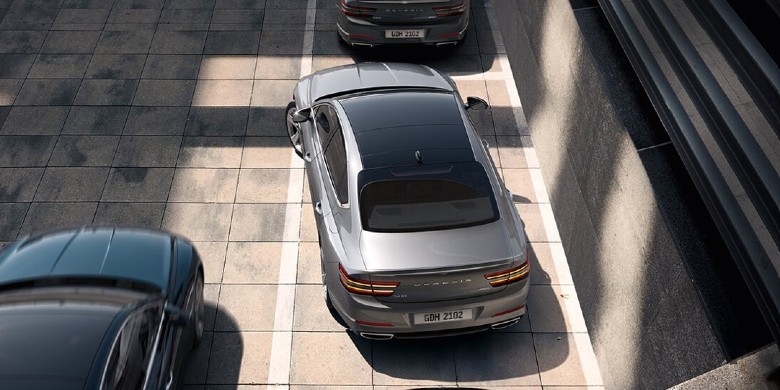
The innovation here isn’t just about automation—it’s about empowerment. Drivers can confidently handle situations that might otherwise cause stress, whether it’s maneuvering in a packed city street or parking in a narrow home garage. It’s the perfect blend of luxury, convenience, and everyday practicality that Genesis is known for.
At Genesis of Milwaukee, customers love seeing this feature in action during test drives. Watching a vehicle park itself with just the push of a button always brings a “wow” moment—and it’s one of those details that shows just how far automotive technology has come.
Try Out Genesis Tech Today!
Genesis continues to raise the bar in innovation, and Remote Smart Parking Assist is proof of that forward-thinking design. Whether you’re tired of circling the lot looking for an easy spot or just want to simplify your daily routine, this technology makes every drive smoother and stress-free. Visit Genesis of Milwaukee in Waukesha, WI, to explore the latest Genesis lineup and discover the ease of effortless parking.
Frequently Asked Questions
Is Remote Smart Parking Assist safe to use?
Absolutely. The system uses various sensors and cameras to monitor the surroundings and will stop the car automatically if it detects an obstacle. However, the driver needs to remain attentive and ready to take control if required.
How far can I stand from my car when using Remote Smart Parking Assist remotely?
You can operate the system from approximately 13 feet away using your key fob.
Can Remote Smart Parking Assist work in both parallel and perpendicular spots?
Yes, the system is designed for both types of parking scenarios, giving you flexibility wherever you go.
Do I need to set up anything before using it?
The feature is ready to go once your vehicle is equipped with it. You can enable or adjust settings in your Genesis infotainment system under the “Driver Assistance” menu.
0 comment(s) so far on How to Use Remote Smart Parking Assist With Your Genesis