
Wireless charging has become one of those small conveniences that quickly feels essential once you’ve used it. And if you’re driving a Genesis sedan—whether it’s the G70, G80, or the flagship G90—you’ve probably noticed just how seamlessly the feature fits into your daily routine. At Genesis of Milwaukee here in Waukesha, WI, drivers often ask how the system works, where the charging pad is located, and what to do if their phone doesn’t start charging right away. So, this guide walks through everything you need to know about Genesis wireless charging, using real-world tips that make ownership easier.
Genesis includes a wireless charging pad in the G70, G80, and G90, designed to keep your phone powered without cable clutter. The feature is simple, but like anything in a luxury vehicle, it helps to understand the details—especially if you’re asking, “How to turn on wireless charging in a Genesis G70?” or how the system behaves across different models.
Wireless charging matters because it keeps your cabin clean, reduces wear on charging ports, and lets you drop your phone on the pad and go. No fumbling with cords, no digging through the center console. Just set it down and let the car handle the rest.
Genesis uses Qi wireless charging car technology, the same standard used by most major smartphone brands. Qi charging works through inductive coils—your phone has one, and the charging pad has another. When the two align, energy transfers wirelessly.
In all three Genesis sedans, the charging pad is built into the center console area, tucked neatly where it’s easy to reach but out of the way while driving. It’s designed to be intuitive, but understanding how it works helps you get the best results.
Even though the system works the same across the lineup, each model places the pad slightly differently:
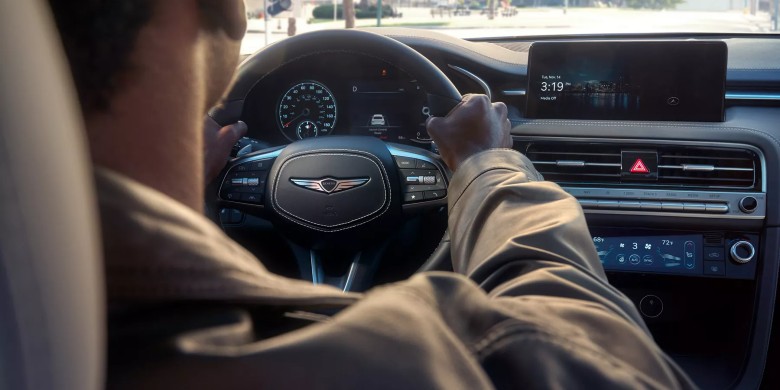
The wireless phone charger for the Genesis G70 sits in the lower center stack, just beneath the climate controls. It’s angled slightly to help keep your phone in place.
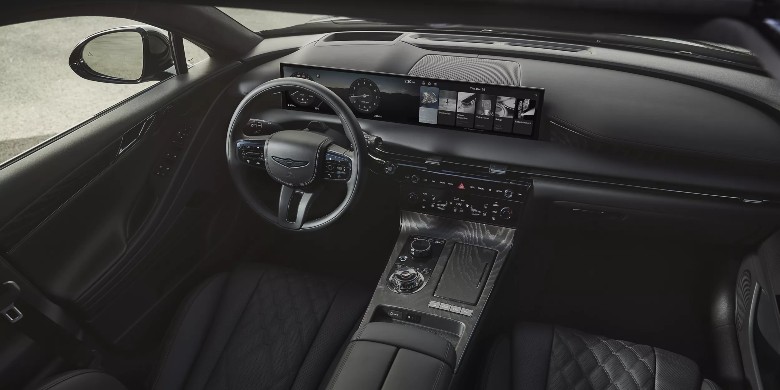
The wireless charging for the G80 pad is located in the center console area, directly ahead of the cupholders.
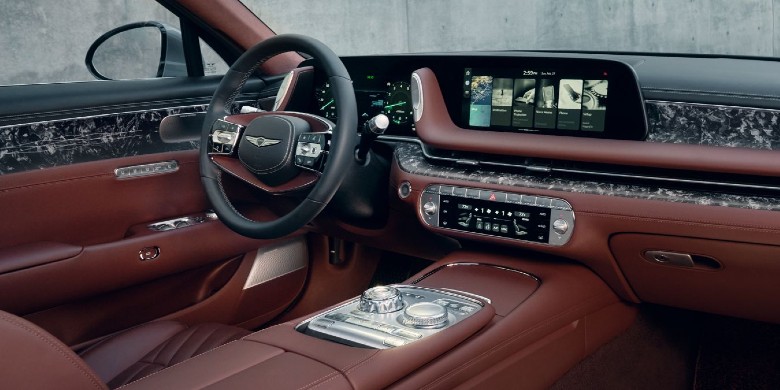
The wireless charging for the G90 setup is positioned in the forward section of the console, with a slightly larger pad to accommodate larger devices.
Across all three models, the placement is intentional—close enough to access, but far enough from your hands so you’re not tempted to check notifications while driving.
Using the Wireless charging pad Genesis system is straightforward:
If you’re asking, “How to know if wireless charging is working?” look for the pad’s indicator light or the charging icon on your phone’s screen. Some models use a small LED that changes color based on charging status, which ties into the wireless charging pad indicator meanings.
Proper alignment matters. If you’ve ever wondered about the best way to align a phone on a Genesis wireless pad, the trick is to center the phone horizontally and make sure the back is flush against the pad.
Most modern smartphones support Qi charging, including:
If you’re unsure, the question “Is my phone compatible with a Genesis wireless charger?” usually comes down to whether your device supports Qi charging. If it does, it’ll work.
To get the best performance:
These small steps help maintain charging speed and prevent interruptions.
If you’ve ever asked, “Why won’t my phone charge on the Genesis wireless charger?” the cause is usually simple:
If you’re driving around and notice the wireless charging pad is not working in your G90, try removing the phone for a moment, letting the pad cool, or restarting the vehicle. Wireless charging naturally generates heat, so occasional pauses are normal. If the indicator light doesn’t turn on, double-check placement. Misalignment is the most common culprit.
Wireless charging is safe, but keep these points in mind:
Genesis designs its charging systems to protect both the vehicle and your device, so the system may pause charging if temperatures rise too high.
Wireless charging in the G70, G80, and G90 adds a layer of convenience that quickly becomes part of your routine. It keeps your cabin clean, your phone powered, and your drive more enjoyable. If you want more how‑to guides or need help with your Genesis technology features, the team at Genesis of Milwaukee is always happy to walk you through it.

Yes, most G80 models include a Qi wireless charging pad in the center console.
Wireless charging activates automatically when the vehicle is on—just place your phone on the pad.
Misalignment, thick cases, or non-Qi devices are the most common reasons.
Check the indicator light on the pad or the charging icon on your phone.
If your device supports Qi wireless charging, it should work with the Genesis pad.